Exploitability Over Severity: How to Prioritize Mobile Findings
Severity labels bury the mobile findings attackers would actually use. Triage by reachability, exposure, preconditions, and impact instead.
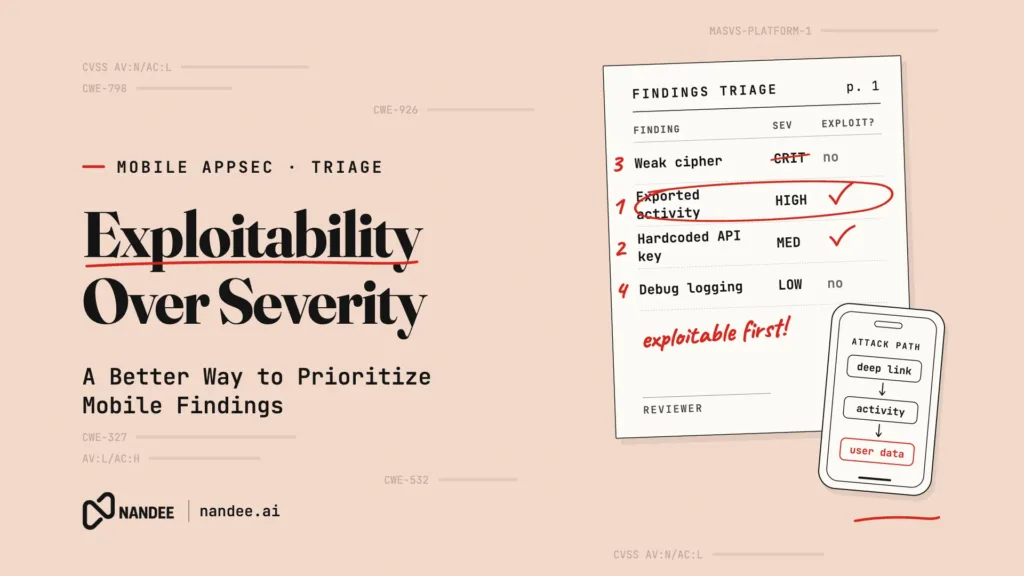
It is Thursday afternoon and the release is scheduled for Monday. The security scan comes back with 47 findings marked Critical or High. The mobile lead skims the list: weak hashing algorithm, weak hashing algorithm, hardcoded string that looks like a key, outdated library, weak hashing algorithm. Most of it looks like noise, nobody has time to check all 47, and the release ships with a note to “revisit next sprint.”
Buried at finding 31, marked Medium, was an exported Android activity that loaded any URL passed to it into a WebView with a JavaScript bridge attached. One malicious link, one tap, and an attacker’s page could read the user’s session token.
The scanner found the right bug. The severity label hid it. This article covers why severity alone is a poor way to prioritize mobile findings, how to think about exploitability instead, and a practical triage method your team can apply on the next scan.
Why Severity Scores Mislead Mobile Teams
Most scanners attach a severity to each finding based on the vulnerability class. Weak cryptography is High. Hardcoded credentials are Critical. Missing certificate pinning is Medium. These labels describe how bad a class of bug can be in general, not how bad this particular instance is in your app.
CVSS has the same limitation. FIRST, which maintains CVSS, is explicit that a base score measures severity, not risk. It describes the intrinsic characteristics of a vulnerability without knowing whether the vulnerable code is reachable, whether the component is exposed, or what data sits behind it.
For mobile apps, that context changes everything. An MD5 call used to build an image cache key is flagged as CWE-327 (Use of a Broken or Risky Cryptographic Algorithm), but it protects nothing, so there is nothing to break. A “hardcoded key” might be a public analytics identifier that is designed to ship in the client. A vulnerable function in a transitive dependency might never be called by your code at all.
Meanwhile, the findings that actually matter often look ordinary: an exported component, a WebView setting, a deep link handler. When a team faces dozens of Criticals that turn out to be harmless, they learn to distrust the whole report, and the real issue gets the same treatment as the noise.
What Exploitability Actually Means
Exploitability asks a different question: what would an attacker need to do to abuse this finding in the shipped app, and what would they get? In practice, it comes down to a few factors.
Reachability
Is the vulnerable code in the release build, and is it on a path that real input can reach? Debug-only code, dead code, test fixtures, and unused library functions are not reachable in production. For dependencies, this is the difference between “we include a vulnerable package” and “we call the vulnerable function.”
Exposure
How does an attacker reach the code? An exported Android component (CWE-926, Improper Export of Android Application Components), a registered URL scheme, a universal link, or a network endpoint is reachable from outside the app. A bug that requires a rooted or jailbroken device, physical access, or a separate compromise is still worth fixing, but it is a different priority.
Preconditions
How much has to go right for the attacker? A finding that triggers on a single tap of a link is very different from one that requires the user to install a malicious app, grant permissions, and open a specific screen.
Impact
What does a successful attack yield? Session tokens, PII, payment details, and PHI sit at the top. Leaking a non-sensitive UI preference sits at the bottom. OWASP MASVS gives a useful map here: findings tied to MASVS-STORAGE, MASVS-AUTH, MASVS-NETWORK, and MASVS-PLATFORM controls that protect sensitive data usually deserve attention first.
Exploit signals for dependencies
For third-party libraries, public signals help. The EPSS score estimates the likelihood that a CVE will be exploited, and the CISA Known Exploited Vulnerabilities catalog lists CVEs with confirmed exploitation in the wild. A reachable dependency vulnerability that appears in KEV goes to the top of the list.
The Finding That Mattered: A Worked Example
Here is the Medium finding from the opening scenario. The manifest registers a deep link:
<activity
    android:name=".PromoWebActivity"
    android:exported="true">
    <intent-filter>
        <action android:name="android.intent.action.VIEW" />
        <category android:name="android.intent.category.DEFAULT" />
        <category android:name="android.intent.category.BROWSABLE" />
        <data android:scheme="acmepay" android:host="promo" />
    </intent-filter>
</activity>
And the activity loads whatever URL it receives:
// Vulnerable: exported component (CWE-926) loads untrusted URLs into a
// WebView that exposes a native bridge returning the session token (CWE-749).
class PromoWebActivity : AppCompatActivity() {
    override fun onCreate(savedInstanceState: Bundle?) {
        super.onCreate(savedInstanceState)
        val webView = WebView(this)
        setContentView(webView)

        webView.settings.javaScriptEnabled = true
        webView.addJavascriptInterface(SessionBridge(this), "Session")

        val target = intent.data?.getQueryParameter("url") ?: return
        webView.loadUrl(target)
    }
}
Run it through the exploitability factors. It is reachable (production code). It is exposed (a browsable deep link that any website or message can trigger). The precondition is a single tap. The impact is session takeover, because a page at acmepay://promo?url=https://attacker.example can call Session.getToken() from JavaScript. That is a top-priority finding, whatever the label says.
The fix restricts what the WebView will load and removes the sensitive bridge:
class PromoWebActivity : AppCompatActivity() {

    private val allowedHosts = setOf("promo.acmepay.com")

    private fun isAllowed(uri: Uri): Boolean =
        uri.scheme == "https" && uri.host in allowedHosts

    override fun onCreate(savedInstanceState: Bundle?) {
        super.onCreate(savedInstanceState)
        val webView = WebView(this)
        setContentView(webView)

        val target = intent.data?.getQueryParameter("url")?.let(Uri::parse)
        if (target == null || !isAllowed(target)) {
            finish()
            return
        }

        webView.settings.javaScriptEnabled = true
        // No JavascriptInterface: session tokens never cross into web content.
        webView.webViewClient = object : WebViewClient() {
            override fun shouldOverrideUrlLoading(
                view: WebView,
                request: WebResourceRequest
            ): Boolean = !isAllowed(request.url) // true cancels the navigation
        }
        webView.loadUrl(target.toString())
    }
}
The validation covers the initial URL and every later navigation, so a redirect from an allowed page cannot take the WebView somewhere else. If the promo page genuinely needs native data, expose only the specific non-sensitive values it needs, and consider WebViewCompat.addWebMessageListener with an explicit set of allowed origins instead of a global JavaScript interface. This maps to MASVS-PLATFORM-1 (secure IPC) and MASVS-PLATFORM-2 (secure WebViews). Our Android app security guide covers components, WebViews, and deep links in more depth.
Meanwhile, those MD5 cache-key findings can be closed as accepted risk with a one-line justification.
A Triage Method You Can Use on the Next Scan
You do not need a new tool to start prioritizing by exploitability. Here is a lightweight method that works with any scanner output.
Filter out what is not in the release build. Remove findings in test code, debug-only flavors, sample apps, and fixtures. This alone often removes a large share of the list.
Group by vulnerability class, not by finding. Ten weak-hash findings are usually one decision: are any of these protecting secrets? Answer once, then close or fix the group.
Ask the four questions for what remains. Is it reachable? How is it exposed? What are the preconditions? What is the impact? Write a short answer for each in the ticket. It takes a minute per finding and creates an audit trail.
Use a simple priority rule. Externally reachable plus sensitive impact plus low preconditions means fix before release. Externally reachable with lower impact, or high impact behind heavy preconditions, means fix this sprint. Everything else goes to the backlog with a documented rationale.
Check dependencies against EPSS and KEV. Then confirm whether your code actually calls the vulnerable function before escalating.
Record accepted risk explicitly. Auditors and enterprise buyers do not expect zero findings. They expect a reasoned decision for each one. “Closed: MD5 used for non-security cache key, no sensitive data” is a defensible answer. Silence is not.
Where Manual Triage Runs Out of Time
This method works, but it costs engineering hours on every scan. A team shipping weekly across iOS, Android, Flutter, and React Native will see new findings with every build, and the four questions require someone who understands both the code and the attack surface. In a 30 to 80 person company, that is often the same one or two people who are also answering security questionnaires and reviewing pull requests.
So triage gets skipped under deadline pressure, and the pattern from the opening repeats: real issues sit in the noise until the week of release, or until after it.
How Nandee Puts Exploitability First
Nandee is an AI Mobile Application Security Engineer built around the idea that a finding is only useful if your team can act on it.
Scan. Nandee runs SAST, DAST, and SCA/OSS analysis across native iOS, native Android, Flutter, and React Native apps, so code issues, runtime behavior, and dependency risk land in one place.
Triage. AI Triage removes false positives and ranks the remaining findings by exploitability, not just by vulnerability class. The exported WebView activity rises to the top. The cache-key hashing does not bury it.
Fix. The Green Agent writes the code fix in the language the finding lives in: Kotlin, Swift, Dart for Flutter, or JS/TS for React Native. Your developers review a proposed change instead of researching each issue from scratch.
Verify. The Red Agent provides AI pentesting that approaches your app the way an attacker would. For launches, audits, or high-stakes releases, Nandee’s expert-led manual pentesting covers mobile and web apps. Healthcare teams can sign a BAA with Nandee.
The result is a short, ranked list your team can trust, with fixes attached, well before release day.
Spend Your Security Hours on What Attackers Would Actually Use
Every team has a finite number of hours for security. Severity labels spread those hours evenly across everything a scanner can name. Exploitability puts them where an attacker would actually go.
Start a scan or book a demo at nandee.ai and see which findings in your current build really matter. Then choose the plan that keeps every release triaged, fixed, and ready to ship.